AB 20 — Access Control Lists (ACLs)
Access Lists (ACLs)
Abschnitt betitelt „Access Lists (ACLs)“Access List Numbers
Abschnitt betitelt „Access List Numbers“Although many different protocols can use access control lists, the CCNA vendor exams are concerned only with IPv4 ACLs. The following chart shows some of the other protocols that can use ACLS.
| 1-99 or 1300-1999 | Standard IPv4 |
|---|---|
| 100-199 or 2000-2699 | Extended IPv4 |
| 600-699 | AppleTalk |
| 800-899 | IPX |
| 900-999 | Extended IPX |
| 1000-1099 | IPX Service Advertising Protocol |
Using Wildcard Masks
When compared to an IP address, a wildcard mask identifies which addresses get matched to be applied to the permit or deny argument in an access control list (ACL) statement:
-
A 0 (zero) in a wildcard mask means to check the corresponding bit in the address for an exact match.
-
A 1 (one) in a wildcard mask means to ignore the corresponding bit in the address – can be either 1 or 0. In the examples, this is shown as x.
-
Example: 172.16.0.0 0.0.255.255
172.16.0.0 = 10101100.00010000.0000000.00000000
0.0.255.255 = 00000000.00000000.11111111.11111111
Result = 10101100.00010000.xxxxxxxx.xxxxxxxx
172.16.x.x (Anything between 172.16.0.0 and 172.16.255.255 will match the example statement.)
Tip
An octet of all 0s means that the octet has to match exactly to the address. An octet of all 1s maens that the octet can be ignored.
ACL Keywords
Abschnitt betitelt „ACL Keywords“| any | Used in place of 0.0.0.0 255.255.255.255, will match any address that it is compared against. |
|---|---|
| host | Used in place of 0.0.0.0 in the wildcard mask, will match only one specific address. |
Creating Standard ACLs
Abschnitt betitelt „Creating Standard ACLs“Note
Standard ACLs are the oldest type of ACL. They date back as early as Cisco IOS Release 8.3. Standard ACLs control traffic by comparing the source of the IP packets to the addresses configured in the ACL.
| Router(config)#access-list 10 permit 172.16.0.0 0.0.255.255 | Read this line to say, “all packets with a source IP address of 172.16.x.x will be permitted to continue through the internetwork. |
|---|---|
| access-list | ACL command. |
| 10 | Arbitrary number between 1 and 99, or 1300 and 1999, designating this as a standard IP ACL. |
| permit | Packets that match this statement will be allowed to continue. |
| 172.16.0.0 | Source IP address to be compared to. |
| 0.0.255.255 | Wildcard mask |
| Router(config)#access-list 10 deny host 172.17.0.1 | Read this line to say, “all packets with a source IP address of 172.17.0.1 will be dropped and discarded.” |
| access-list | ACL command. |
| 10 | Arbitrary number between 1 and 99, or 1300 and 1999, designating this as a standard IP ACL. |
| deny | Packets that match this statement will be dropped and discarded. |
| host | Keyword. |
| 172.17.0.1 | Specific host address. |
| Router(config)#access-list 10 permit any | Read this line to say, “all packets with any source IP address will be permitted to continue through the internetwork.” |
| access-list | ACL command. |
| 10 | Arbitrary number between 1 and 99, or 1300 and 1999, designating this as a standard IP ACL. |
| permit | Packets that match this statement will be allowed to continue. |
| any | Keyword to mean all IP addresses. |
Tip
An implicit deny statement is hard coded into every ACL. You cannot see it, but it states, “deny everything not already permitted.” This is always the last line of any ACL. If you want to defeat this implicit deny, put a permit any statement in your standard ACLs or permit ip any any in your extended ACLs as the last line.
Applying Standard ACLs to an Interface
Abschnitt betitelt „Applying Standard ACLs to an Interface“| Router(config)#interface gigabitethernet 0/0 | Moves to interface configuration mode. |
|---|---|
| Router(config-if)#ip access-group 10 in | Takes all access list lines that are defined as being part of group 10 and applies them in an inbound manner. Packets going into the router from giga-bitethernet 0/0 will be checked. |
Tip
Access lists can be applied in either an inbound direction (keyword in) or in an outbound direction (keyword out).
Tip
Not sure in which direction to apply an ACL? Look at the flow of packets.
-
Do you want to filter packets as they are going in a router’s interface from an external source? Use the keyword in for this ACL.
-
Do you want to filter packets as they go out of the router’s interface toward another device= Use the keyword out for this ACL.
Tip
Apply a standard ACL as close as possible to the destination network or device.
Verifying ACLs
Abschnitt betitelt „Verifying ACLs“| Router#show ip interface | Displays any ACLs applied to that interface |
|---|---|
| Router#show access-lists | Displays the contents of all ACLs on the router |
| Router#show access-list access-list-number | Displays the contents of the ACL by the number specified |
| Router#show access-list name | Displays the content of the ACL by the name specified |
| Router#show run |
Removing ACLs
Abschnitt betitelt „Removing ACLs“| Router(config)#no access-list 10 | Removes all ACLs numbered 10 |
|---|
Creating Extended ACLs
Abschnitt betitelt „Creating Extended ACLs“Note
Extended ACLs were also introduced in Cisco IOS Release 8.3. Extended ACLs control traffic by comparing the source and destination of the IP packets to the addresses configured in the ACL. Extended ACLs can also filter packets using protocol/port numbers for a more granular filter.
| Router(config)#access-list 110 permit tcp 172.16.0.0.0 0.0.0.255 192.168.100.0 0.0.0.255 eq 80 | Read this line to say, “HTTP packets with a source IP address of 172.16.0.x will be permitted to travel to the destination address 192.168.100.x.” |
|---|---|
| access-list | ACL command. |
| 110 | Number is between 100 and 199, or 2000 and 2699, designating this as an extended IP ACL. |
| permit | Packets that match this statement will be allowed to continue. |
| tcp | Protocols must be TCP. |
| 172.16.0.0 | Source IP address to be compared to. |
| 0.0.0.255 | Wildcard mask for the source IP address. |
| 192.168.100.0 | Destination IP address to be compared to. |
| 0.0.0.255 | Wildcard mask for the destination IP address. |
| eq | Operand, means « equal to ». |
| 80 | Port 80, indicating HTTP trafic. |
| Router(config)#access-list 110 deny tcp any 192.168.100.7 0.0.0.0 eq 23 | Read this line to say, “Telnet packets with any source IP address will be dropped if they are addressed to specific host 192.168.100.7.” |
| access-list | ACL command. |
| 110 | Number is between 100 and 199, or 2000 and 2699, designating this as an extended IP ACL. |
| deny | Packets that match this statement will be dropped and discarded. |
| tcp | Protocols must be TCP. |
| any | Any source IP address. |
| 192.168.100.7 | Destination IP address to be compared to. |
| 0.0.0.0 | Wildcard mask: address must match exactly. |
| eq | Operand, means “equal to.” |
| 23 | Port 23, indicating Telnet traffic. |
Applying Extended ACLs to an Interface
Abschnitt betitelt „Applying Extended ACLs to an Interface“| Router(config)#interface gigabitethernet 0/0 Router(config-if)#ip access-group 110 out | Moves to interface configuration mode and takes all access list lines that are defined as being parts of a group 110 and applies them in an outbound manner. Packets are going gigabitethernet 0/0 will be checked. |
|---|
Tip
Access lists can be applied in either an inbound direction (keyword in) or in an outbound direction (keyword out).
Only one access list can be applied per interface, per direction.
Apply an extended ACL as close as possible to the source network or device.
Configuration Examples: ACLs
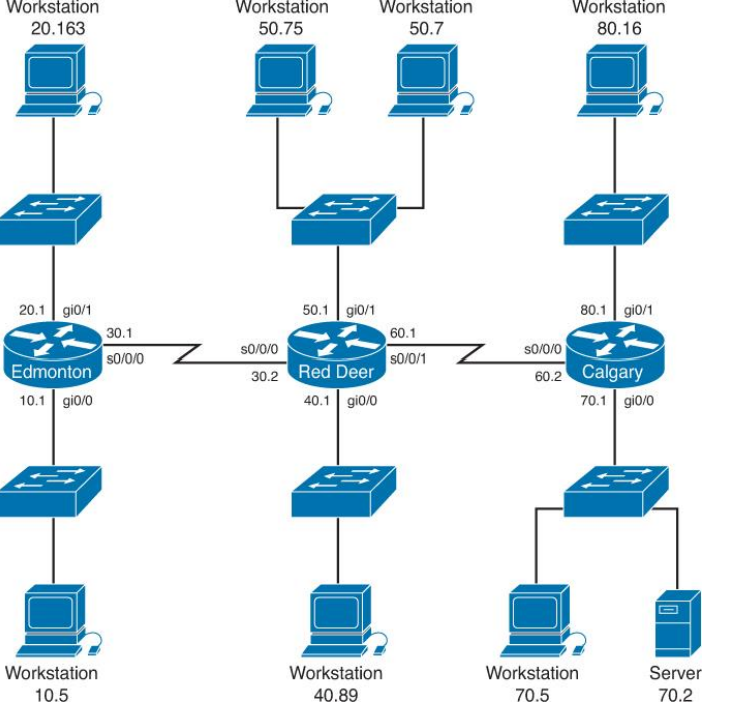
Abschnitt betitelt „Configuration Examples: ACLs“The network topology for the configuration that follows shows five ACL examples using the commands covered in this chapter.
Example 1: Write an ACL that prevents the 10.0 network from accessing the 40.0 network but allows everyone else to.
| RedDeer(config)#access-list 10 deny 172.16.10.0 0.0.0.255 | The standard ACL denies complete network for complete TCP/IP suite of protocols. |
|---|---|
| RedDeer(config)#access-list 10 permit any | Defeats the implicit deny. |
| RedDeer(config)#interface gigabitethernet 0/0 | Moves to interface configuration mode. |
| RedDeer(config)#ip access-group 10 out | Applied ACL in an outbound direction. |
Example 2: Write an ACL that states that 10.5 cannot access 50.7. Everyone else can.
| Edmonton(config)#access list 115 deny ip host 172.16.10.5 host 172.16.50.7 | The extended ACL denies specific hostfor entire TCP/IP suite to a specific destination. |
|---|---|
| Edmonton(config)#access list 115 permit ip any any | All others are permitted through. |
| Edmonton(config)#interface gigabitethernet 0/0 | Moves to interface configuration mode. |
| Edmonton(config)#ip access-group 115 in | Applies the ACL in an inbound direction. |
Example 3: Write an ACL that states that 10.5 can Telnet to the Red Deer router. No one else can.
| RedDeer(config)#access-list 20 permit host 182.16.10.5 | The standard ACL allows a specific host access. The implicit deny statement filters everyone else out. |
|---|---|
| RedDeer(config)#line vty 0 4 | Moves to virtual terminal lines configuration mode. |
| RedDeer(config-line)#access-class 20 in | Applied ACL 20 in an inbound direction. Remember to use access-class, not access-group. |
Example 4: Write a named ACL that states that 20.163 can Telnet to 70.2. No one else from 20.0 can Telnet to 70.2. Any host from any other subnet can connect to 70.2 using anything that is available.
| Calgary(config)#ip access-list extended serveraccess | Creates a named ACL and moves to named ACL configuration mode. |
|---|---|
| Calgary(config-ext-nacl)#10 permit tcp host 172.16.20.163 host 172.16.70.2 eq telnet | This specific host is permitted Telnet access to a specific destination. |
| Calgary(config-ext-nacl)#20 deny tcp 172.16.20.0 0.0.0.2555 host 172.16.70.2 eq telnet | No other hosts are allowed to telnet to the server. |
| Calgary(config-ext-nacl)#30 permit ip any any | Defeats the implicit deny statement and allows all other traffic to pass through. |
| Calgary(config-ext-nacl)#exit | Returns to global configuration mode. |
| Calgary(config)#interface gigabitethernet 0/0 | Moves to interface configuration mode. |
| Calgary(config)#ip access-group serveraccess out | Sets the ACL named serveraccess in an outbound direction on the interface. |
Example 5: Write an ACL that states that hosts 50.1-60.63 are not allowed web access to 80.16. Hosts 50.64-50.254 are. Everyone can do everything else.
| RedDeer(config)#access-list 101 deny tcp 172.16.50.0 0.0.0.63 host 172.16.80.16 eq 80 | Creates an ACL that denies HTTP traffic from a range of hosts to a specific destination |
|---|---|
| RedDeer(config)#access-list 101 permit ip any any | Defeats the implicit deny statement and allows all other traffic to pass through |
| RedDeer(config)#interface gigabitethernet 0/0 | Moves to interface configuration mode |
| RedDeer(config)#ip access-group 101 in | Applied the ACL in an inbound direction |
Aufgaben
Abschnitt betitelt „Aufgaben“Teil 1 – Verständnisfragen
Abschnitt betitelt „Teil 1 – Verständnisfragen“-
Was sind ACLs und wozu dienen diese?
-
Was ist der Unterschied zwischen einer Standard ACL und einer Extended ACL?
Teil 2 – ACLs konfigurieren
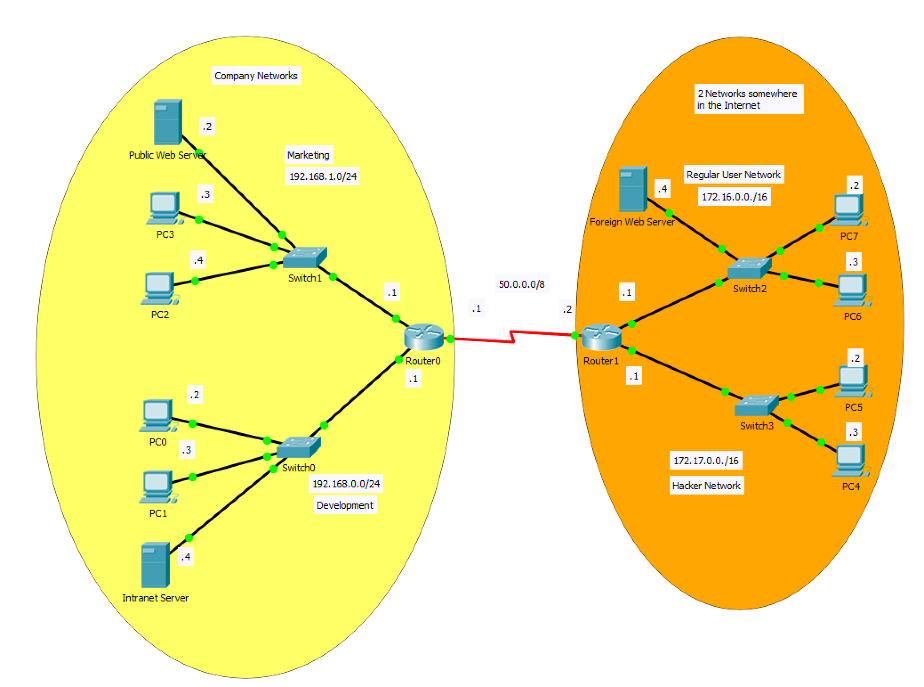
Abschnitt betitelt „Teil 2 – ACLs konfigurieren“Erstelle das obere Netzwerk und konfiguriere die folgenden ACLs auf Router 0:
-
Nur der Web-Service des öffentlichen Web Servers soll übers Internet erreichbar sein.
-
Der Web-Service des Intranet Servers soll aus dem Development Netzwerk, aber auch aus dem Marketing-Netzwerk erreichbar sein. Andere Verbindungen des Marketing-Netzwerks ins Development Netzwerk sollen geblockt werden.
-
Sowohl die Mitarbeiter der Marketing-Abteilung als auch die Mitglieder der Development Abteilung, sollen Verbindungen zu Servern im Internet initialisieren und deren Dienste nutzen können. So soll z.B. der Dienst des Foreign Web Servers verfügbar sein. Informiere dich über das Schlüsselwort established und ändere die ACLs so um, dass dies möglich ist.
-
Da aus dem Netzwerk 172.17.0.0/16 dauernd Attacken auf den öffentlichen Webserver beobachtet werden, soll nur dieses Netzwerk keine Verbindung mehr zum öffentlichen Web Server herstellen können.
Die folgenden beiden Links werden dir die Arbeit erleichtern: